
How to Add/Change My Horse's Required Documents
Save your horse's health documents once, keep the current files active, and reuse them when entering future shows.
About 5 minutes · Reviewed for EZSM 5.2.539Open your horse's documents
- Log in and open My Dashboard.
- Select My Horses.
- Select the horse card to expand it.
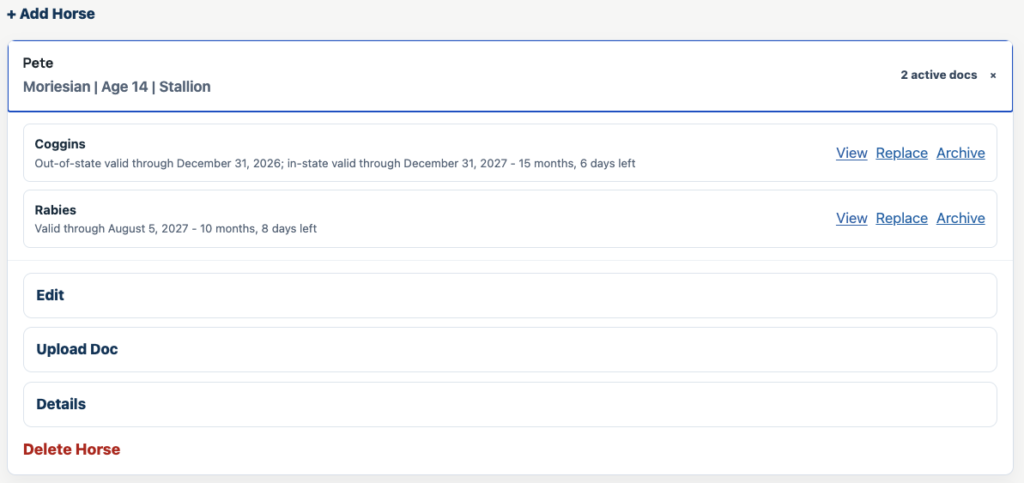
The expanded card shows the horse's active documents and the available actions: View, Replace, and Archive. If the horse is not listed yet, select + Add Horse first.
Add a document
- Expand the horse card and select Upload Doc.
- Choose the document type.
- Enter the date shown on the document.
- Choose the file, then select Upload Document.
You can upload a PDF, JPG, JPEG, or PNG file up to 5 MB. A current document appears in the active-document list and may be used when a future show requests that document type.
EZ Show Manager uses that date to calculate and display when the record expires. A document that is already expired is moved directly to the archived-document list.
Replace a document
Use Replace when you uploaded the wrong file or received a newer version of a document that should remain active.
- Select View if you want to confirm which file is currently saved.
- Select Replace beside the active document.
- Enter the date shown on the replacement document.
- Choose the new file and select Replace Document.
The new file replaces the old one and stays active. If the old document was already linked to a show entry, EZ Show Manager updates that entry with the replacement and marks the document for the show team to review again.
Do not archive the document and upload another one. Archiving does not change the copy already attached to an existing show entry; replacing does.
Archive an older document
Use Archive for a document that has aged out or that you no longer want included with future entries.
- Select Archive beside the active document.
- Confirm the archive action.
- Open Details and look under Archived Documents whenever you need to view the older record.
Archiving removes the file from the active list without deleting the saved record. EZ Show Manager also archives expired documents automatically.
How document dates are displayed
EZ Show Manager calculates the displayed validity period from the date entered during upload:
- Coggins: through December 31 of the document year for out-of-state use; through December 31 of the following year for in-state use
- Rabies: one year
- EHV: six months
- CVI: 30 days
States, venues, and show organizers may apply different document rules. The dates shown in My Horses help organize your records but do not replace the requirements published for the event.
Using saved documents for a new entry
When you select a saved horse while entering a show, EZ Show Manager can use that horse's active, unexpired documents for the types requested by the organizer. Review the entry before checkout to make sure the correct horse and documents are attached.
If a show entry already exists and its attached file is wrong, return to My Horses and use Replace. The updated document will be sent back to the show team for review.