
Event Discounts for Members
Reward current club or organization members with a fixed-dollar or percentage discount on eligible show entry fees.
About 4 minutes · Reviewed for EZSM 5.2.537Add member pricing to a created show
- Open My Dashboard → Show Manager.
- Find the show and select Edit.
- Scroll to Entry Settings.
- Check Enable member pricing.
- Confirm the Membership Name. For a Blue Ribbon Memberships account, the organization name is filled in automatically.
- Choose the Member Pricing Method.
- Enter the discount amount or percentage.
- Save the show.
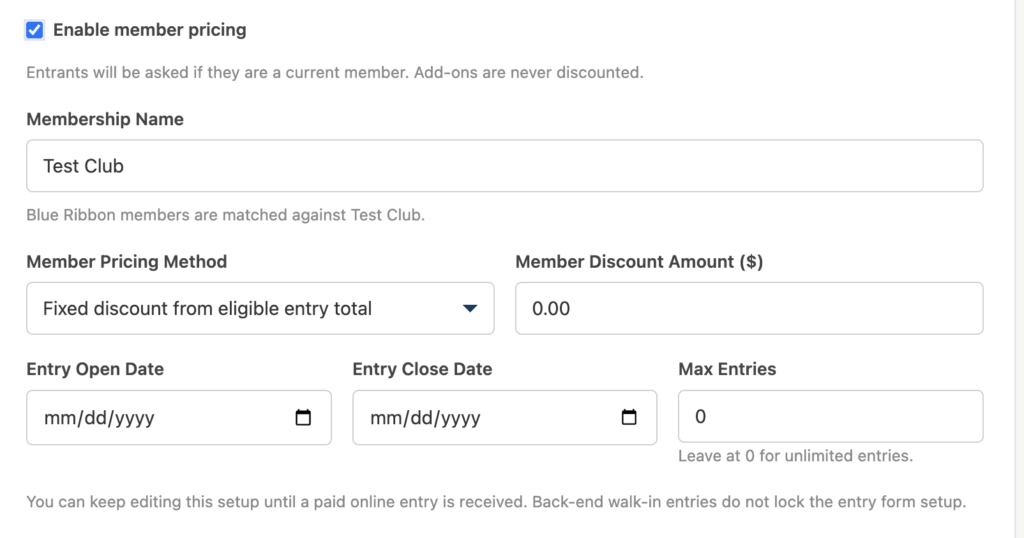
A created show can be edited until it receives a paid online entry. Closed and completed shows are also locked. Back-end walk-in entries do not lock the setup.
Choose the discount
- Fixed discount from eligible entry total: Subtracts one dollar amount from the complete eligible entry total. For example, a $10 discount reduces a $50 eligible entry total to $40.
- Percentage discount from eligible entry total: Reduces the complete eligible entry total by the percentage entered. For example, 10% reduces a $50 eligible entry total to $45.
The discount can reduce the eligible entry total to $0, but never below $0.
What is discounted?
Member pricing applies to the show’s eligible entry charges, including the applicable:
- Flat entry fee
- Class fees
- Division fees
- Dressage or driving test fees
Optional or required add-ons remain at their full price. Checkout processing or service fees are also calculated separately from the member discount.
What happens when a member registers?
- The exhibitor signs in to EZ Show Manager and opens the show’s entry form.
- EZ Show Manager compares the email address on the signed-in account with the organization’s current membership records.
- If the email is verified, the form confirms that member pricing will be applied.
- As the exhibitor chooses classes, divisions, or tests, the order summary calculates the regular eligible total and subtracts the member discount.
- The exhibitor completes checkout using the discounted entry total, plus any full-price add-ons and applicable checkout fees.
The checkout record is also marked Member Pricing: Yes.
How membership is verified
The email on the exhibitor’s signed-in EZ Show Manager account must match a current, unexpired membership record for the organization.
For a Group membership, EZ Show Manager can verify either:
- The primary member’s email address
- An additional member email saved with the Group membership
The discount applies to qualifying members across the organization’s active membership levels; it is not limited to one specific level.
If the discount is not recognized
- Confirm the exhibitor is signed in with the same email saved on the membership.
- For a Group membership, confirm that person’s email was entered under Additional Members.
- Confirm the membership level is active and the member record has not expired.
- If the person just joined, refresh the show entry form after the membership form is completed.
An exhibitor who is not verified sees that member discounts are available and can follow the link to learn more about joining.
Important limitation
Member pricing is available for supported shows and events, but it is not used for Clinic-style registration. Clinics have their own participant, auditor, and session pricing tools.