
Liability Waivers
Upload your organization's waiver, choose the information entrants must provide, and retain a detailed record when the waiver is accepted.
About 6 minutes · Reviewed for EZSM 5.2.537Set up your waiver
- Open My Dashboard.
- Select Show Settings, then open Waiver.
- Turn on Add a waiver to my shows.
- Upload the waiver document your organization has approved.
- Choose the acceptance, entrant-information, age, safety, and signature requirements.
- Save your settings.
When creating a show, confirm that Require waiver for this show is selected under Entry Settings. The waiver settings become the default for new shows, but you should verify each show before entries open.
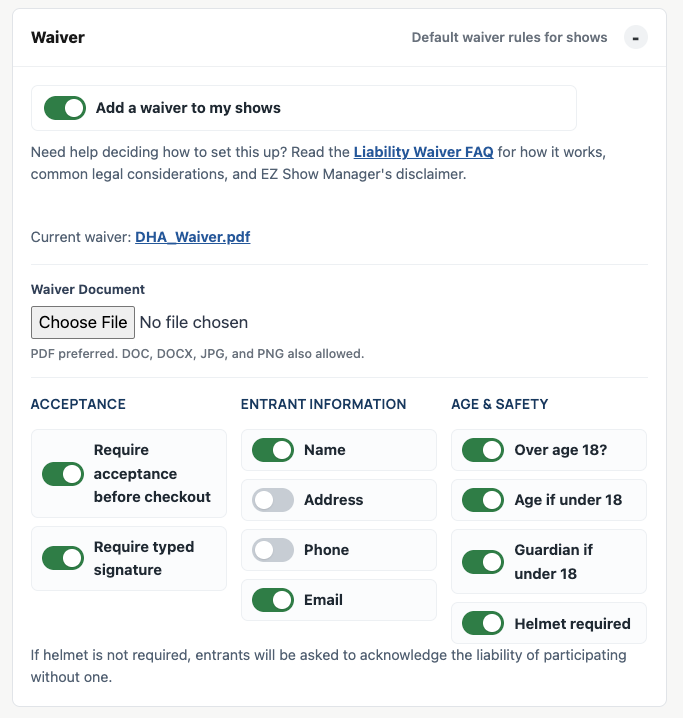
Waiver requirements
You can choose which information the waiver collects or requires:
- Name
- Phone
- Address
- Whether the entrant is over 18
- Age when the entrant is under 18
- Parent or guardian name when the entrant is under 18
- Helmet-use or helmet-risk acknowledgment
You can also require acceptance before checkout and a typed electronic signature.
How signing works
When acceptance before checkout is required, EZ Show Manager can:
- Require the entrant to open the waiver document before accepting it.
- Require a typed electronic signature.
- Check that the typed signature matches the expected signer name.
- Use the parent or guardian as the expected signer when the entrant is under 18.
- Require acknowledgment when helmets are mandatory.
- Require under-18 entrants to acknowledge helmet use even when helmets are optional for adults.
- Require an adult who chooses not to wear a helmet to acknowledge the displayed risk statement.
For an adult entrant, the typed signature must match the entrant name. When the entrant is under 18 and a guardian name is provided, the typed signature must match the guardian name.
What is recorded
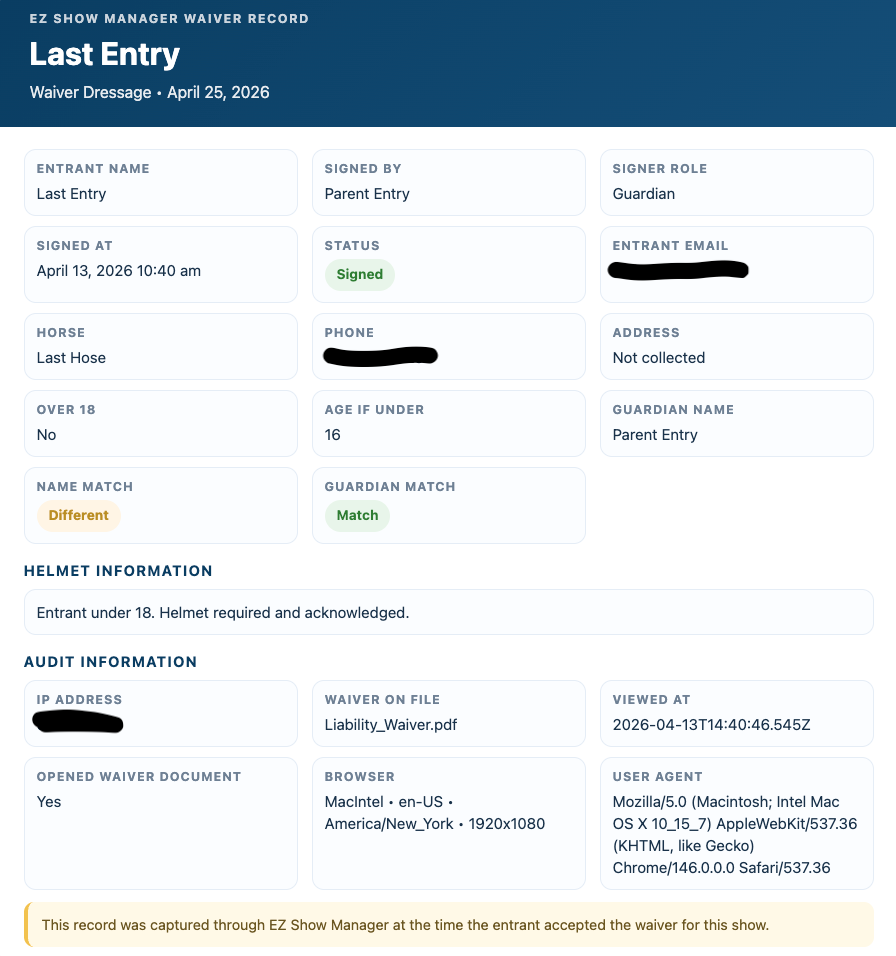
A signed waiver record can include:
- A preserved copy of the waiver document version used when the entrant signed
- Entrant name, email, phone, and address when collected
- Typed signer name and whether the signer was the entrant or guardian
- Guardian name and signature-name comparison
- Age and helmet responses when collected
- Date and time of acceptance
- Confirmation that the waiver document was opened
- IP address
- Browser, platform, language, timezone, screen, and user-agent details when available
- The related show, entry, horse, and order information
Archived waiver versions can be reviewed separately from the current waiver document.
Find signed waiver records
- Open My Dashboard and select Waivers.
- Search by entrant, horse, or show, or use the Show filter.
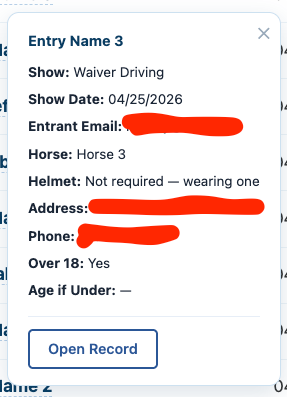
- Select the entrant name to open the quick details.
- Select Open Record to review the full signing record.
Electronic-signature background
Electronic-signature laws generally recognize that a signature or record should not be denied legal effect solely because it is electronic. The exact requirements, exceptions, evidentiary rules, and rules for minors depend on the transaction and jurisdiction.
- Federal E-SIGN Act — 15 U.S.C. § 7001
- New York Electronic Signatures and Records Act guidance
- Uniform Electronic Transactions Act information
These references provide general background only. They do not establish that a particular waiver is valid or enforceable.
Canadian compliance references
Canadian electronic-signature, privacy, consumer-protection, and liability rules vary by province. These official sources provide a starting point for organizations operating in Canada:
- Canada — Personal Information Protection and Electronic Documents Act (PIPEDA)
- Office of the Privacy Commissioner of Canada — meaningful consent guidance
- Ontario — Electronic Commerce Act, 2000
- British Columbia — Electronic Transactions Act
- Quebec — Act respecting the protection of personal information in the private sector
Article 1474 of the Civil Code of Quebec does not permit a person to exclude or limit liability for bodily or moral injury. An electronic signature does not change that restriction. A Quebec event may still use a province-specific risk acknowledgment and other permitted terms, but the document should be prepared or reviewed by a qualified Quebec lawyer before the organizer relies on it.
Important legal and insurance disclaimer
The platform provides tools to collect, store, and organize waiver records. It does not create your waiver, determine whether its wording is legally sufficient, or guarantee enforceability in any jurisdiction.
Your organization is responsible for:
- The wording and legal sufficiency of its waiver
- Determining whether the waiver complies with applicable federal, state, provincial, or local law
- Confirming whether minors require additional parental consent, witnesses, notarization, or recordkeeping
- Following any requirements imposed by its insurer, venue, sanctioning body, or governing organization
- Choosing an appropriate document-retention policy
Have an attorney and your insurance provider review the waiver and signing process before relying on them for an event.