
Managing Auditors
Allow people to attend without riding, charge by the clinic day or offer free auditing, and keep each day's auditor list organized in the Secretary Office.
About 5 minutes · Reviewed for EZSM 5.2.537Enable auditors during clinic setup
- While creating or editing the clinic, open Clinic Configuration.
- Turn on Allow Auditors to register for this clinic.
- Enter the Auditor Fee Per Day.
- For each clinic day, enter the Max Auditors allowed that day.
Enter $0.00 for a free auditor RSVP. Enter 0 for Max Auditors when the number of auditors is unlimited.
Each clinic day has its own rider capacity and auditor capacity. Filling the rider spaces does not close auditor registration while auditor spaces remain.
How auditors register
Auditors use the same public registration form as clinic participants. On the first step, someone attending without a horse selects I will be auditing only.
The form then skips the horse and riding-day steps. The auditor:
- Selects one or more clinic days to audit
- Sees the auditor fee and remaining capacity for each day
- Selects any available add-ons
- Completes the waiver when the clinic requires one
- Reviews the order and completes checkout when payment is due
The auditor fee is charged for each selected day. For example, a $20 daily fee with two auditor days selected produces $40 in auditor fees before any add-ons or applicable checkout fees.
Riders can also add auditor days
A person does not have to be auditor-only. A clinic participant can select their riding days and then add one or more auditor days during the Auditor step.
This is useful at a multi-day clinic when someone rides on one day but wants to watch the clinician work with other riders on another day.
When riding spots are full
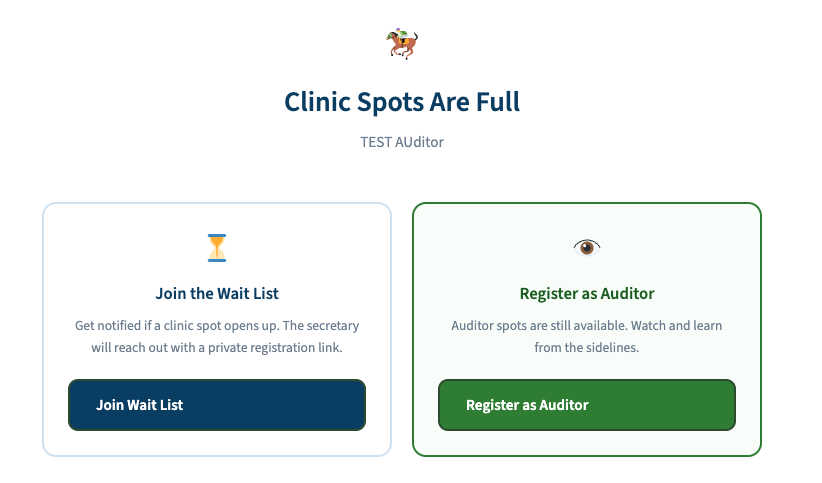
If all public riding spots are filled but auditor space is still available, the public clinic page offers two choices:
- Join the Wait List for a riding spot
- Register as Auditor for an available auditor day
Auditor registration remains available for each day until its auditor capacity is reached. A full auditor day is marked Full and cannot be selected on the public form.
Auditor registration does not require entry approval
An auditor-only registration is added to the Auditor tab after the free registration is submitted or the required payment is completed. It does not wait in Pending Entries for rider approval.
A participant who is both riding and auditing still follows the normal rider approval process. After approval, the participant appears with the riders for their riding day and with the auditors for each selected auditor day.
View registered auditors
- Open the clinic in the Secretary Office.
- Select the Auditors tab.
- Review the list under each clinic day.
The Auditor tab displays:
- Name
- Email address
- Purchased add-ons, such as lunch
The day headings make it easy to use the list for auditor check-in, add-on distribution, or meal counts.
Add an auditor on clinic day
Use + Walk-In Entry in the Clinic Secretary Office when an auditor registers at the event:
- Enter the person's contact information.
- Select Add as Auditor Only.
- Choose the auditor day or days.
- Select any add-ons.
- Review the calculated total and save the walk-in.
Collect any amount due through the clinic's day-of payment process.