
Managing the Clinic Wait List
Review people waiting for a riding spot, offer a specific clinic day and entry type, and send a private link when you are ready for them to register.
About 5 minutes · Reviewed for EZSM 5.2.537How someone joins the wait list
When the clinic's public riding spaces are full, the registration page offers a Join Wait List option. The person provides:
- Name and email address
- A preferred clinic day, or No Preference
- Optional notes for the organizer
The Show Manager receives an email when someone joins. Joining the wait list does not create a clinic entry, collect payment, or guarantee a spot.
Open the clinic wait list
- Open the clinic in the Secretary Office.
- Select the Wait List tab.
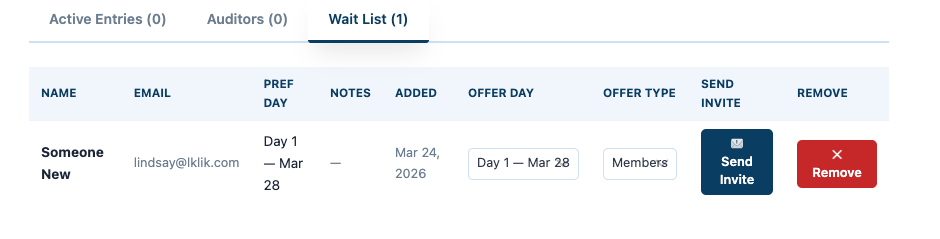
- Review each person's name, email, preferred day, notes, and the date they joined.
Send an invitation
- Find the person you want to invite.
- Under Offer Day, choose the clinic day you are offering. It may be different from the person's preferred day.
- Under Offer Type, choose the entry type and price being offered.
- Select Send Invite.
The participant receives an email showing the offered day and entry type. The email contains a private registration link and an option to remove themselves from the wait list.
Sending an invitation does not reserve the space or collect payment. The participant must use the private link, complete the entry form, and finish checkout when payment is required.
What the private link does
The private link opens the registration form with the offered clinic day and entry type selected. It can be used once and allows that participant to register for the offered spot even when normal public registration for riders is full.
After the participant successfully completes registration, the wait-list record is marked as used and no longer appears as an active wait-list request. Their clinic entry then follows the normal entry and approval process.
Invite only the number of people you are prepared to accept. A private link is an intentional offer to add that rider, including when the clinic has already reached its listed public capacity.
Add an extra clinic spot
You may also invite someone when the clinician approves an additional rider or more time becomes available. Choose the approved day and entry type, then send the invitation in the same way.
This is useful when:
- A registered participant cancels
- The schedule has room for another rider
- The clinician approves increasing the group size
Remove someone from the wait list
Use Remove beside the person's name when they no longer want a spot or should no longer receive an invitation. Confirm the removal when prompted.
A participant can also select Remove Me From the Wait List in an invitation email. When they remove themselves, the Show Manager receives a notice that the wait list changed.
A person on the wait list has not completed an entry or paid for that wait-list request. Removing the request only removes their name and private invitation access.
Replacing a canceled clinic entry
If a registered rider cancels, you may invite someone from the wait list before completing the original rider's refund when that timing is allowed by your published clinic refund policy.
- Choose the wait-listed person and send an invitation for the available day and entry type.
- Wait until the replacement registration and any required payment are complete.
- Process the original rider's eligible refund according to your stated policy.
A full eligible refund is returned to the original card less processing fees. Any partial refund must be handled separately by the organization using cash or check.
The wait list does not automatically change or delay a refund. Clearly state your clinic's cancellation and refund terms before registration and follow those terms consistently.