
My Memberships - View/Edit Club/Organization Memberships
Review the club and organization memberships connected to your account, update your member information, and choose whether to receive renewal reminders.
About 4 minutes · Reviewed for EZSM 5.2.537Open My Memberships
- Log in and open My Dashboard.
- Select My Memberships.
- Select a membership card to expand it.
Each card identifies the club or organization, your membership level, expiration date, and current status. When expanded, it also shows the date joined and whether the membership is for an individual or a group.
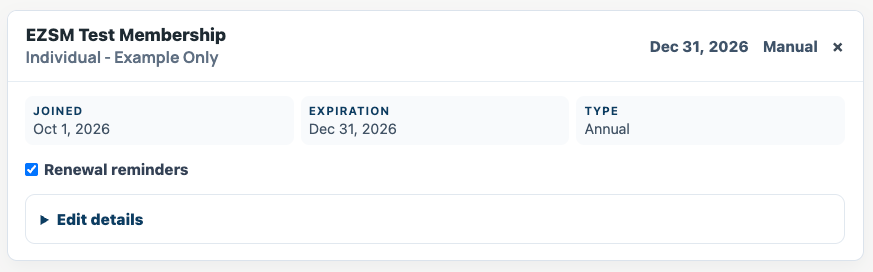
Update your member details
- Expand the membership card.
- Open Edit details.
- Update your name, email address, phone number, or mailing address.
- If shown, update any membership questions or additional group members.
- Select Save Changes.
A confirmation appears after the information is saved. Changes apply to this membership record and give the club or organization the updated details it needs.
If the organization created this as a group or family membership, Edit details also lets you add or update the names and email addresses of the people covered by it.
Choose renewal reminders
Select Renewal reminders if you want EZ Show Manager to email you as the membership approaches its expiration date. Open Edit details and select Save Changes after changing this setting.
When reminders are enabled and the membership is eligible, they are scheduled for 30 days, 14 days, 7 days, and 1 day before expiration. The email includes a link to the organization's renewal page.
Turning on reminders does not renew the membership, charge a card, or authorize a payment. You must follow the renewal link and complete the organization's renewal process.
Information controlled by the organization
The club or organization controls the membership level, membership type, joined date, expiration date, and status shown on the card. These fields are displayed for reference and cannot be changed from My Memberships.
Contact the club or organization directly if you believe one of these details is wrong, need to change membership levels, have a payment question, or want the organization to change the membership's status.
If a membership is missing
My Memberships displays records connected to your EZ Show Manager account or its email address. Make sure you are signed in with the account used when you joined.
If the membership still does not appear, contact the club or organization and provide the name and email address used on the membership form so they can locate the record.