
Using Entry Cards for Show Check-In
Run the day-of-show check-in process online from Active Entries, verify each competitor's information, and keep important details close at hand.
About 4 minutes · Reviewed for EZSM 5.2.537Use Active Entries as your check-in list
Your day-of-show entry process can be handled online without printing a separate check-in list. When a competitor arrives:
- Ask for the name on the entry.
- Open the correct show in the Secretary Dashboard.
- Find the competitor under Active Entries.
- Confirm the competitor and horse before continuing.
An entry may appear in more than one class. You can select the competitor's name from any of those active rows to open the entry card.
Verify the show schedule
Use the Active Entries table to confirm the competitor's:
- Entry number
- Divisions and classes
- Group or section
- Ring assignment
- Ride or show time
Review the information with the competitor so questions can be resolved before they leave the check-in area.
Open the entry card
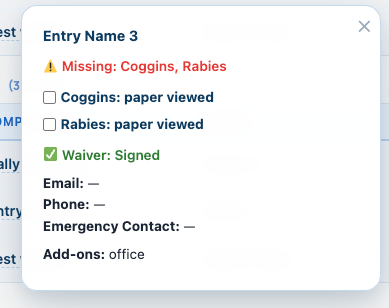
Select the competitor's name in Active Entries to open the entry card. Depending on the show and the information collected, the card can display:
- Required health-document status
- Waiver status
- Email and phone number
- Emergency contact information
- Add-ons, additional-question answers, and entry notes
Review missing documents
If the card identifies a required document as missing, ask the competitor to show you the paper or electronic copy they brought to the show.
- Review the document and confirm it is the requested type.
- Confirm the identifying information and validity are acceptable for the event.
- Select the document's paper viewed checkbox on the entry card.
The checkbox records that the show team inspected the document presented at check-in. It should not be used simply to clear a missing-document notice.
Emergency contact information
The entry card is also where the entrant's emergency contact information is kept. If an emergency occurs, select the competitor's name in Active Entries to retrieve the available contact name and phone information.
Contact, emergency, waiver, and document information should be accessed only by authorized show staff when it is needed for show operations or safety.
Finish check-in
Once the entry, schedule, required documents, and waiver status have been verified, hand the competitor their entry packet and wish them a great show.