
Using the FX Button to Score Ridden or Driven Dressage
Enter the figures from the judge's test sheet and let the FX tool calculate the score before it is saved to the entry and displayed on the Results Page.
About 4 minutes · Reviewed for EZSM 5.2.539Use these instructions for USEF/USDF Dressage, WDAA, and Driven Dressage shows. Driving CT has additional Dressage, Cones, Pace, and final scoring tools and is covered separately.
FX is a convenience calculator, not a required scoring step. You can type a completed score directly into the Score field, enter a place manually, or override an FX-calculated score or automatically calculated place at any time. The value currently saved in each field is the value shown on the Results Page.
Where to find the FX button
- Open the show in the Secretary Office.
- Approve the entry so it appears under Active Entries.
- Expand the appropriate test or division-and-test group.
- Find the entrant's Dressage score field.
- Select the small fx button beside the score field.
You may enter the entry number and Ride Time or Drive Time before scoring, but those fields are not required for the FX calculation.
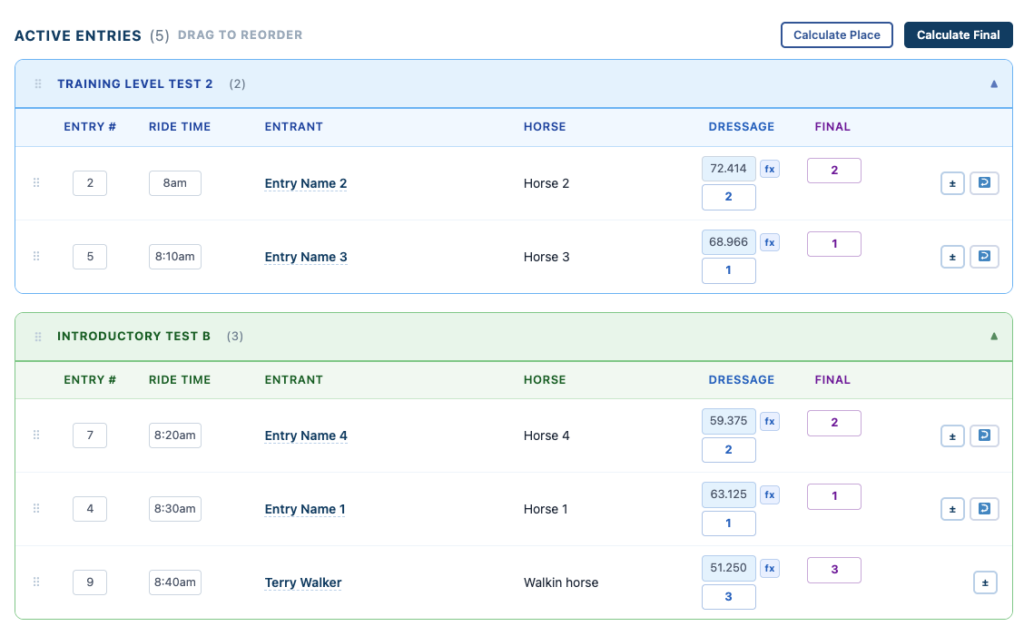
Ridden Dressage and WDAA
For a USEF/USDF or WDAA test, the FX button converts the judge-sheet points into a percentage:
- Select fx beside the entrant's Dressage score.
- Enter the subtotal points from the judge's test sheet.
- Enter the total error deduction, or enter 0 when there is no deduction.
- Review the subtotal, deduction, total points, and calculated percentage shown in the confirmation.
- Select OK to apply the score, or Cancel to return without changing it.
The calculation is:
(Subtotal Points − Error Deduction) ÷ Maximum Points × 100
The percentage is saved to three decimal places in the Dressage score field.
Driven Dressage
For a Driven Dressage test, the FX button uses the test's saved factor to convert the judge's points into penalty points:
- Select fx beside the entrant's Dressage score.
- Enter the total points awarded by the judge.
- Enter the judge's penalty points, or enter 0 when there are none.
- Review the maximum points, factor, factored points, penalty conversion, judge penalties, and total penalty points.
- Select OK to apply the score, or Cancel to return without changing it.
The calculation is:
160 − (Judge Points × Test Factor) + Judge Penalties
The resulting penalty score is saved to two decimal places in the Dressage score field.
Review before applying
The FX tool does not save immediately after the numbers are entered. It first displays the complete calculation for review.
- Select OK only when the figures match the judge's sheet.
- Select Cancel and run the FX tool again when a number was entered incorrectly.
- You may also type a completed score directly into the score field when the calculation was performed elsewhere.
- An FX-calculated score can be replaced at any time by typing the corrected score into the field.
The FX button performs the calculation but does not replace the secretary's responsibility to confirm the source figures, deductions, test, and final score.
Calculate placings
After all scores for the test have been entered and reviewed, select Calculate Place at the top of Active Entries.
- USEF/USDF and WDAA: Higher percentage scores place ahead of lower scores.
- Driven Dressage: Lower penalty scores place ahead of higher penalty scores.
- Entries with equal numeric scores receive the same place.
- An entry already marked SC or DQ is left out of the automatic numeric placing calculation.
Calculate Place is also optional. Review the places after calculation and type directly into any Place field to add, correct, or override a result at any time.
What exhibitors see
Saved scores and places are reflected on the show's Results Page. The results remain grouped by the test—or by division and test for Driven Dressage—so exhibitors can follow the same organization used in the Secretary Office.
Results displayed during the event are not final until confirmed by the Show Secretary.
If the FX button cannot calculate the score
The FX tool requires the selected test to have its scoring information configured in EZ Show Manager. If a message says that no configuration, maximum points, or factor was found:
- Confirm the entry is assigned to the correct test.
- Do not guess the missing scoring value.
- Enter an independently verified completed score directly, or contact EZ Show Manager support with the show name and test name.