What Is the Memberships Feature and How Do You Get It?
Memberships gives a Blue Ribbon organization one place to offer membership levels, keep active member records, manage renewals and private lists, communicate with members, and connect verified membership discounts to EZ Show Manager shows.
About 6 minutes · Reviewed for EZSM 5.2.539What is the Memberships feature?
Memberships is an optional account tool for clubs and organizations using Blue Ribbon. It replaces scattered spreadsheets and disconnected signup forms with membership records connected to the same account used to create and manage shows.
Organizations can create public Annual or Lifetime membership options, collect enrollment and renewal forms, and maintain Private lists for roles that are assigned internally.
Private levels are hidden, manager-controlled lists for groups such as board members, committees, or volunteers. Public enrollment is offered through the organization’s priced Annual or Lifetime membership levels.
Why organizations use it
- Keep searchable active membership lists and detailed member records in one place.
- Offer Single or Group membership levels for individuals, families, or other multi-member accounts.
- Collect contact details, mailing addresses, additional member names, and answers to custom membership questions.
- Track Annual and Lifetime memberships and their expiration information.
- Send automated renewal reminder emails before an Annual membership expires.
- Allow members to review and update their own membership information under My Memberships.
- Add members manually or bring an existing membership list into EZ Show Manager using the Excel import tools.
- Download membership lists as CSV files for club records.
Renewal reminders and late-year enrollment
Annual memberships can send renewal reminders approximately 30, 14, 7, and 1 day before expiration. Members may turn those reminders on or off from their My Memberships record.
The system reminds the member and provides a renewal path. It does not automatically rebill the member’s credit card.
For calendar-year memberships, you may also choose a late-join rollover beginning September 1, October 1, November 1, or December 1. Someone joining on or after the selected cutoff receives the remainder of the current year plus the following membership year.
Email and communication tools
Each membership list includes two ways to contact its members:
- Send Email: Opens your email application with the membership addresses placed in BCC so members do not see one another’s addresses.
- Email Form: Write and send a message from EZ Show Manager. Messages are delivered to the members individually.
Renewal reminders can be disabled by the member. Organizations are responsible for honoring other unsubscribe or opt-out requests and following the email rules that apply to them.
Private member lists
Private levels make it easy to organize active members into internal groups such as:
- Board Members
- Committee Members
- Volunteer Members
- Officials or other organization-specific groups
From View Members, select one or more names and add them to another list, move them between lists, or remove them from a list. The organization can allow a person to belong to more than one membership when needed.
Member discounts for shows
When creating an EZ Show Manager show, the organization can enable member pricing and connect it to its active membership records. A verified member may receive either a fixed-dollar or percentage discount on eligible entry, class, test, or division fees.
Add-ons are never reduced by the member discount.
How to get Memberships
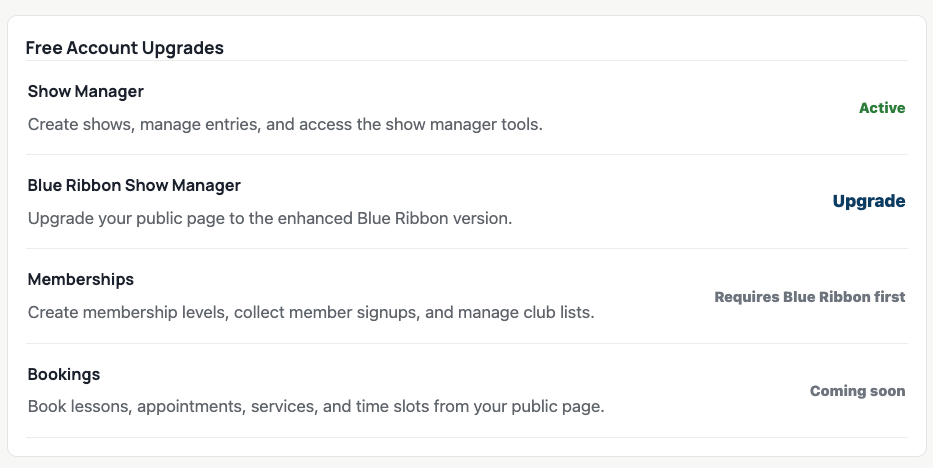
The Memberships tool is enabled through the account’s Free Account Upgrades. The required upgrade order is:
- Sign in and open My Dashboard → Home.
- If needed, select Upgrade beside Show Manager.
- Select Upgrade beside Blue Ribbon Show Manager.
- Select Enable beside Memberships.
These are self-service account upgrades. You do not need to submit a request or wait for EZ Show Manager approval.
When Memberships displays as Active, its setup and member-management pages become available in My Dashboard.
This refers to enabling the EZ Show Manager feature on your account. It does not create a free membership level for customers.
What to do after enabling it
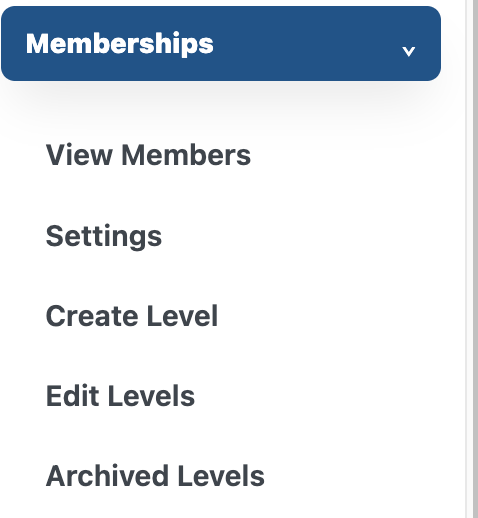
- Open My Dashboard → Memberships.
- Enter the club or organization name and choose whether a person may belong to multiple memberships.
- Create the Annual, Lifetime, and Private levels the organization needs.
- Add any optional questions that should appear on public membership forms.
- Use the Blue Ribbon Page Builder to add a Memberships - List or Memberships - Cards section to the public page.
- Use View Members to manage incoming and existing membership records.