
When Do I Get Paid?
Your show's online payout begins after the event is finished and you select Archive & Pay Me. EZ Show Manager reviews payout requests daily, then sends approved funds to your connected Stripe account.
About 4 minutes · Reviewed for EZSM 5.2.537The short answer
EZ Show Manager does not automatically begin payout when entries close or when the show date passes. When the event and its financial activity are complete, the Show Manager must select Archive & Pay Me.
That submits the payout for review. After EZ Show Manager sends the funds to Stripe, Stripe and the receiving bank complete the deposit according to the connected account's payout settings and processing schedule.
Why payout waits until the show ends
Holding the online proceeds until the show is complete allows an eligible entry to be fully refunded to the original credit card before the remaining show funds are paid out.
Finish all entry corrections and eligible full-refund requests before archiving the show. Partial refunds are handled separately by the organization using cash or check.
Request your payout
- Confirm that Stripe direct deposit is completely set up under Payment Setup.
- Finish the show and review all entries, results, and refund requests.
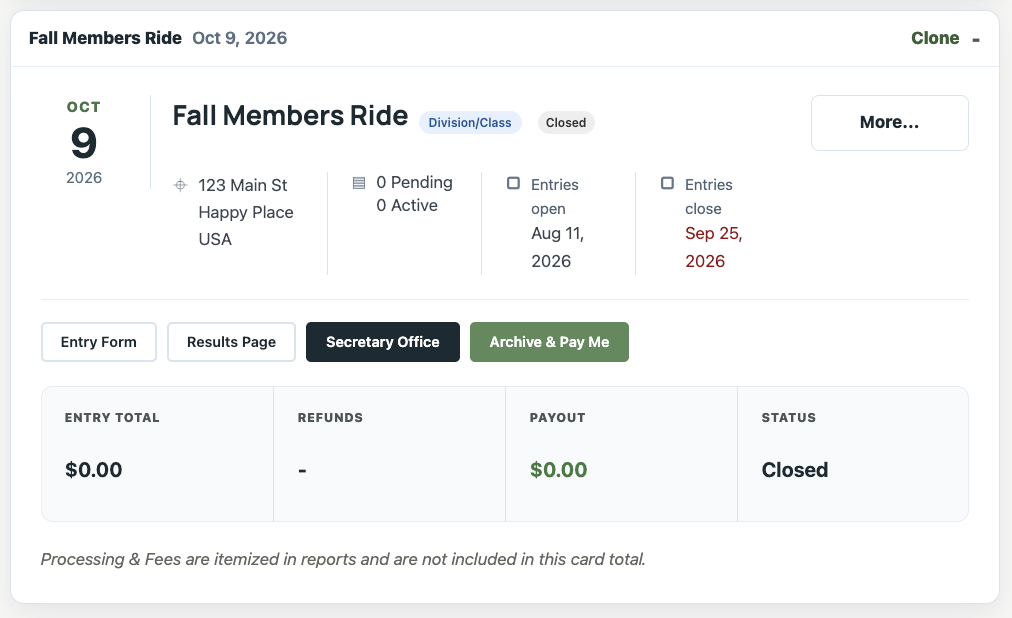
- Expand the show card under My Dashboard → Show Manager.
- Review the Entry Total, Refunds, expected Payout, and Cash Box.
- Select Archive & Pay Me and confirm the action.
The show moves from Open Shows to Archived Shows and enters the payout-review queue.
Payout status stages
Expand the show under Archived Shows to follow its status:
- Ready for Payout: The request was submitted and is waiting for or undergoing EZ Show Manager review. Funds have not been sent yet.
- Paid ✓: EZ Show Manager successfully sent the payout to the connected Stripe account. The date shown is the date the payout was sent to Stripe.
After EZ Show Manager sends the funds, Stripe may still need to move them from the connected Stripe balance to the bank account.
How long does it take?
EZ Show Manager reviews payout requests daily. After a payout is sent to Stripe, most deposits are processed within a few days.
The exact bank-deposit date can vary based on:
- Your connected Stripe account's verification and payout schedule
- Whether Stripe is using automatic or manual payouts for the account
- Your bank's processing time
- Weekends and bank holidays
- Stripe reviews, reserves, or other payment-processor holds
EZ Show Manager cannot guarantee the date on which Stripe or the bank makes the funds available.
How the money reaches your bank
EZ Show Manager sends the approved online payout to the Stripe account connected to your Show Manager account. Stripe then sends the available balance to the bank account supplied during Stripe setup.
Depending on the settings available for your connected Stripe account, Stripe may use:
- Automatic payouts: Stripe deposits available funds on its configured schedule.
- Manual payouts: You initiate the bank payout from Stripe after funds become available.
Review the connected Stripe account when you need to confirm its payout schedule, bank details, verification requests, or bank-deposit status.
What is included in the payout?
The Stripe payout is based on eligible online entry money collected for the show, less completed refunds or other applicable adjustments.
Walk-in and add/drop money collected on site is tracked in the Cash Box but is not included in the Stripe payout.
Why might a payout be delayed?
A payout may require additional review when there are unresolved refunds, chargebacks, processor holds, incomplete Stripe verification, missing payout information, or other financial or compliance concerns.
If the archived show remains Ready for Payout longer than expected, first check Payment Setup and the connected Stripe account for requested information. Contact EZ Show Manager support with the show name if no action is shown.