
Why You Need an Account to Enter a Show
Your free account keeps your entries, horses, documents, waivers, and show information connected to you in one secure place.
About 4 minutes · Reviewed for EZSM 5.2.539Why an account is required
Creating an account gives EZ Show Manager a secure way to connect an entry and its private records to the correct exhibitor. It also gives you a place to return after checkout instead of treating every show entry as an unrelated guest purchase.
One free account lets you:
- Enter shows and clinics offered through EZ Show Manager
- Keep each entry and its payment status connected to your account
- Review current and previous entries under My Shows
- Check entry status, entry number, classes, ride times, and results when available
- Upload a required document that was missing when you entered
- View the waiver record connected to an entry
- Contact the Show Manager about a specific entry
- Scratch from a show when that option is available
- Save horse profiles and reusable health documents under My Horses
You do not need to purchase a membership to enter a show. The same account can be used for future EZ Show Manager entries.
What happens when you open an entry form
If you are not signed in, the show entry page displays two choices:
- Log In if you already have an EZ Show Manager account
- Create Free Account if this is your first entry
EZ Show Manager remembers the show you were trying to enter. After you log in or finish creating the account, you are returned to that show's entry page.
Create your account
- Select Create Free Account from the show entry page.
- Choose a username.
- Enter your first and last name.
- Create and confirm your password.
- Enter and confirm your email address.
- Choose United States or Canada as your account country.
- Review and agree to the Terms of Service.
- Submit the registration form.
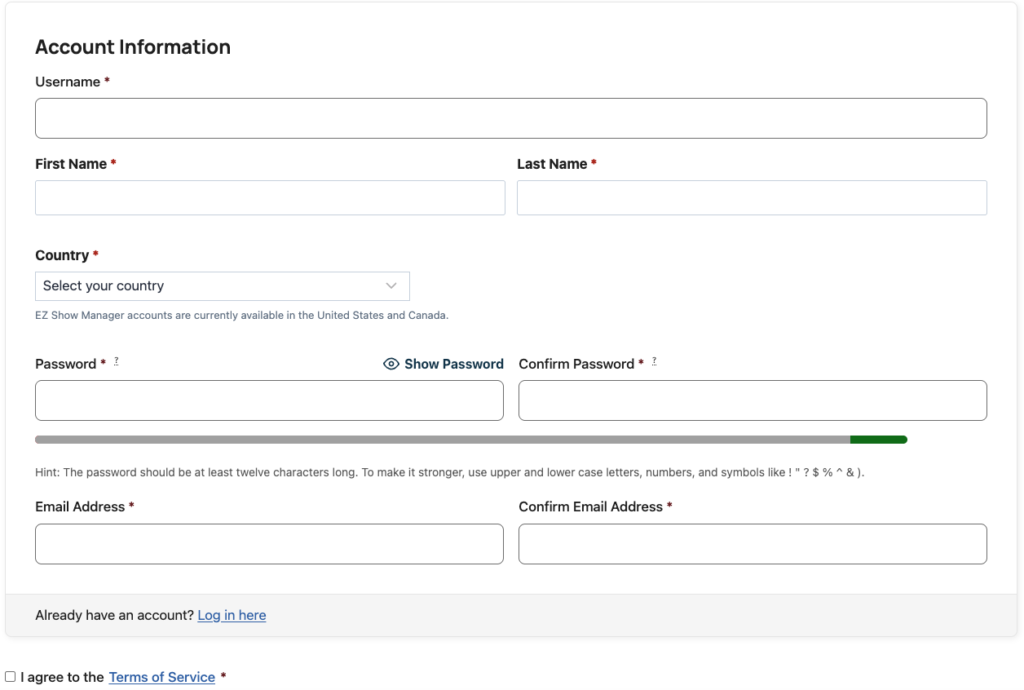
After registration returns you to the show, finish the entry form and complete checkout. Your place in the show is not recorded as a paid entry merely because the account was created.
Finish entering the show
Once you return to the entry form, the questions and steps depend on the type of show. You may be asked for:
- Entrant and emergency-contact information
- A saved horse or a new horse profile
- Classes, divisions, tests, clinic choices, or other entry selections
- Coggins, rabies, EHV, CVI, or other requested documents
- Waiver acceptance and a typed signature
- Add-ons or additional questions selected by the organizer
Review the total, proceed to checkout, and complete payment. After checkout, the entry appears under My Dashboard → My Shows.
Saved horses and documents
When you enter a new horse, you can save that horse to My Horses. Documents uploaded for a saved horse can also be stored there for later shows.
For a future entry, choose the saved horse instead of entering the same information again. EZ Show Manager can use the horse's active saved documents when the new show requests those document types.
Open My Dashboard → My Horses to view, replace, or archive a saved document. Replacing a document keeps the new file active; archiving moves an older document out of the active list.
If you already have an account
Do not create another account for each show. Select Log In and use your existing username or email address. This keeps all of your entries, horses, and documents together.
If you cannot access the account, use the password-reset option or contact EZ Show Manager support before creating a duplicate.