
Scoring a Driving CT
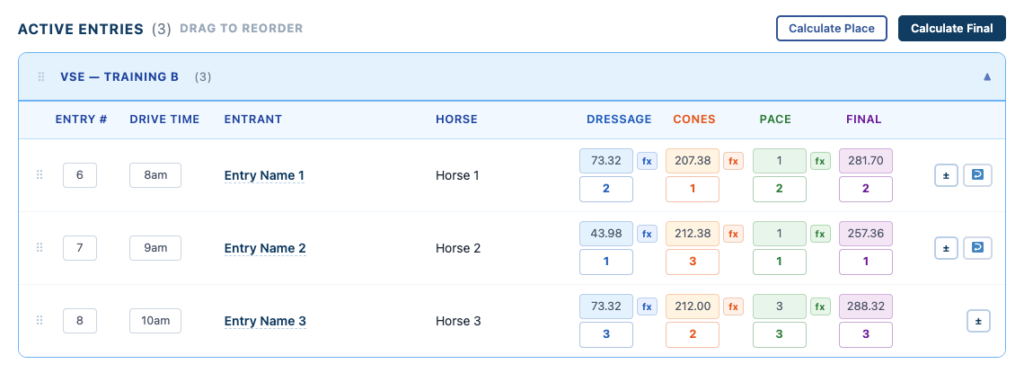
Score Dressage and optionally add Cones, Pace, or both. EZ Show Manager includes only the phases your event uses when it calculates and displays results.
About 7 minutes · Reviewed for EZSM 5.2.537Choose the phases your event uses
A Driving CT can be run with different combinations of the currently available scoring phases:
- Dressage only: Enter Dressage scores and leave both Cones and Pace blank.
- CT: Enter Dressage and Cones scores and leave Pace blank.
- Full CT with Pace: Enter Dressage, Cones, and Pace scores.
- Dressage with Pace: Enter Dressage and Pace scores and leave Cones blank when that is the format your event uses.
You opt into Cones or Pace by entering numeric scores in that phase. A phase left blank for every entry is not included in the final calculation and is not shown on the public Results Page.
Do not enter 0 merely to show that a phase was not used. Zero is a numeric score, so it activates that phase and includes it in results. Leave every score in the unused phase empty.
What is not available yet
A CDE or Combined Driving Event that includes an obstacle or Marathon phase is in development but is not currently available. Do not use the existing Pace field as a substitute for obstacle scoring.
Before scoring
- Open the Driving CT in the Secretary Office.
- Approve each entry so it appears under Active Entries.
- Expand the appropriate division-and-test group.
- Enter the entry number and Drive Time when used by your event.
- Score only the phases included in the event.
The small fx buttons are calculation tools. The score and place fields remain editable, but Cones has an important separate-penalty requirement explained below.
Dressage scoring
The Dressage FX button uses the driven-dressage penalty calculation:
- Select fx beside the Dressage score.
- Enter the total points awarded by the judge.
- Enter the judge's penalty points, or 0 when there are none.
- Review the test maximum points, factor, factored points, penalty conversion, and final penalty score.
- Select OK to apply the score.
Dressage Penalty Score = 160 − (Judge Points × Test Factor) + Judge Penalties
The saved Dressage penalty score is used in both the Dressage phase and the final combined score. Lower is better.
See Using the FX Button to Score Ridden or Driven Dressage for the complete Dressage FX walkthrough.
Cones scoring
Use the Cones FX button when the event includes Cones:
- Select fx beside the Cones score.
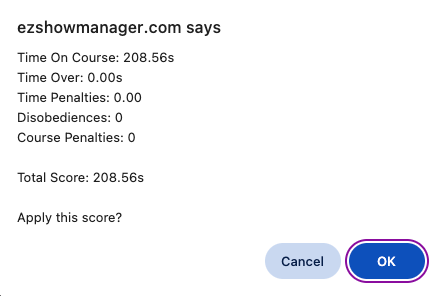
- Enter the Time Allowed on Course in MM:SS.hh format.
- Enter the competitor's Time on Course in MM:SS.hh format.
- Enter the Disobedience penalty value, or 0.
- Enter the Course Penalty value, or 0.
- Review the calculation and select OK to apply it.
The current calculation is:
- Time Over = Time on Course − Time Allowed, but never less than 0
- Time Penalty = Time Over × 0.5, rounded to two decimal places
- Cones Penalties = Time Penalty + Disobedience Penalties + Course Penalties
- Cones Phase Score = Time on Course in seconds + Cones Penalties
The Cones phase is placed using the full Cones Phase Score, but the final combined score adds only the Cones Penalties. The competitor's raw elapsed time is not added to the final combined penalty total.
The FX tool saves both the visible Cones Phase Score and the separate Cones Penalties used by Calculate Final. If a Cones result needs correction, run FX again with the corrected figures instead of changing only the visible score field.
Pace scoring
Use the Pace FX button only when the event includes a Pace phase:
- Select fx beside the Pace score.
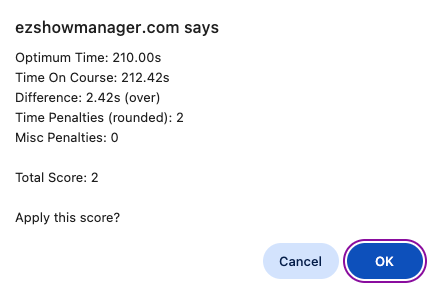
- Enter the predetermined Optimum Time in MM:SS.hh format.
- Enter the competitor's Time on Course in MM:SS.hh format.
- Enter any additional miscellaneous penalties, or 0.
- Review the calculation and select OK to apply it.
The current calculation is:
- Time Difference = the absolute difference between Time on Course and Optimum Time
- Time Penalty = Time Difference rounded to the nearest whole second
- Pace Score = Time Penalty + Miscellaneous Penalties
Being either over or under the optimum time creates a penalty. The Pace Score is also the amount added to the final combined penalty total. Lower is better.
How the final score is calculated
The Final score is the sum of the numeric phase penalties available for that entry:
Final Score = Dressage Penalty Score + Cones Penalties + Pace Score
Only phases containing numeric scores are included:
- Dressage-only show: Final equals the Dressage penalty score.
- Dressage + Cones CT: Final equals Dressage plus Cones penalties.
- Full CT with Pace: Final equals Dressage plus Cones penalties plus Pace score.
The Final score displayed in the Secretary Office and Results Page updates from the currently saved phase information.
Calculate phase and final placings
- Enter and verify all scores for the phases being used.
- Select Calculate Place to calculate each active phase's placings.
- Select Calculate Final to calculate overall final placings.
- Review all places before treating the results as final.
- Lower numeric scores place ahead of higher scores in Driving CT phases.
- Equal numeric phase scores receive the same phase place.
- Final placing uses the lower combined penalty total first.
- If final totals are equal, the lower Dressage penalty score is used next.
- SC and DQ entries are excluded from automatic numeric placing.
Manual entries and corrections
FX and the placing buttons are calculation conveniences. Score and place fields can be edited manually, and a calculated place can be overridden when an official decision requires it.
For Dressage and Pace, a verified completed score may be typed directly. For Cones, use FX whenever the phase contributes to Final so the separate Cones penalty amount is also updated correctly.
What appears on the Results Page
The public Results Page checks the active entries for numeric scores:
- Dressage appears after at least one numeric Dressage score is entered.
- Cones appears after at least one numeric Cones score is entered.
- Pace appears after at least one numeric Pace score is entered.
- An unused phase with no numeric scores is omitted.
The Final column remains available for the combined score and final place. Results displayed during the event are not final until confirmed by the Show Secretary.