
Search
Understanding Your Payout Breakdown
Each show includes a detailed financial summary on your Show Card so you can clearly see how your payout is calculated.
Where to Find It
- Go to your Show Manager Dashboard
- Locate your show’s Show Card
- Review the financial table
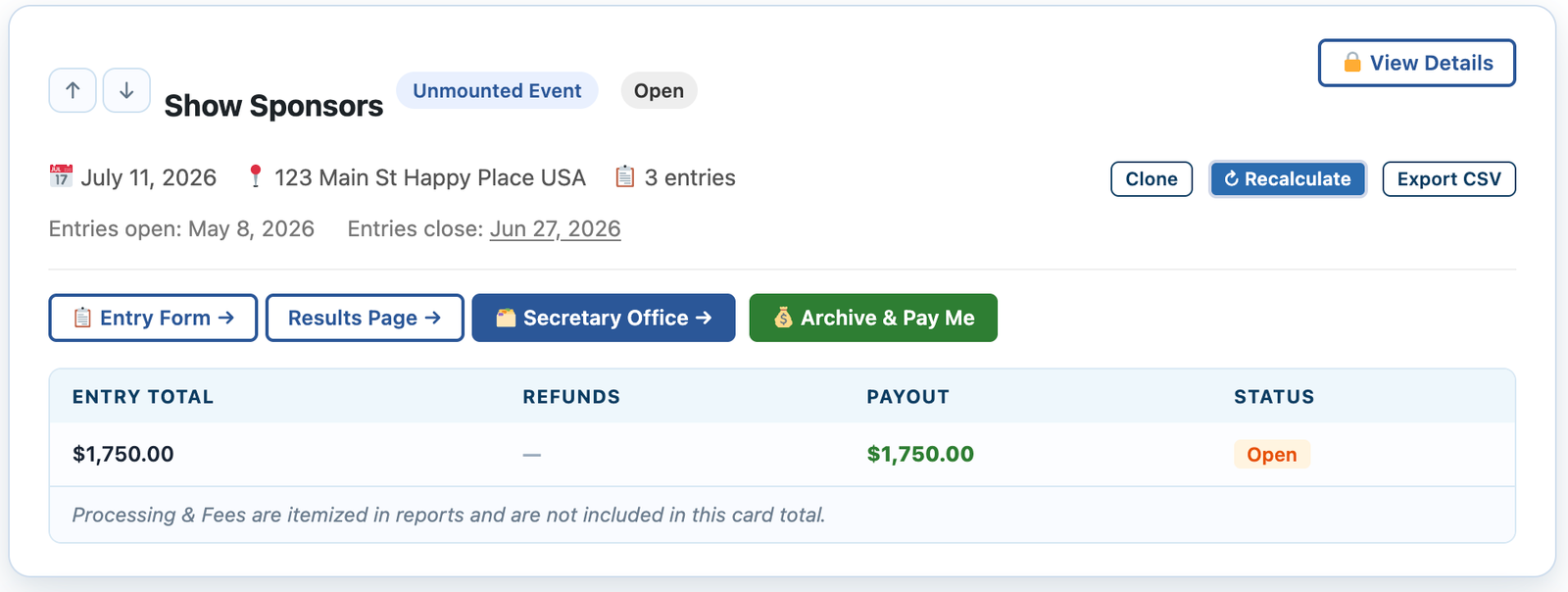
What the Entrant Pays
At checkout, the total includes:
- Entry fees you set
- Add-ons you create
- EZ Show Manager and Credit Card Fee
👉 This is the full total displayed to the entrant
What Each Line Means
Entry Total
- Total amount collected from online entries
- Includes:
- Entry fees
- Add-ons
Refunds
- Amount you initiated for a refund of an entry
Payout to You
- Final amount you will receive
👉 Based on:
- Online Entry – Refunds + Invoice Paid = Payout
Status
Shows the current state of your show or payout:
- Draft
- Open
- Closed
- Pending → Processing → Paid
Recalculate Button
If anything looks off:
👉 Click Recalculate
- Updates all totals
- Ensures everything reflects the latest data
Before You Pay Out
Always verify:
- Payout amount looks correct
👉 Once confirmed, you’re ready to Archive & Pay Out
Why This Matters
- Full transparency into your finances
- Prevents payout confusion
- Keeps your show balanced and accurate