
Search
Ridden Dressage – Secretary Dashboard
The Secretary Dashboard for USEF/USDF Dressage shows is designed to follow standard dressage workflows while simplifying scoring and organization.
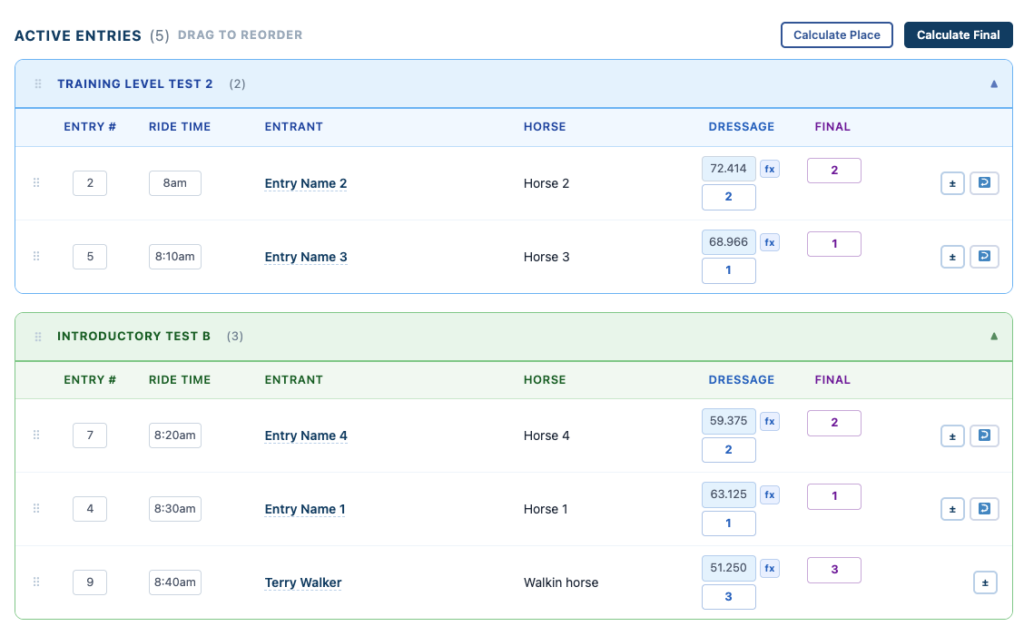
Managing Entries
Within each test, you can:
- Assign Entry Numbers
- Assign Ride Times
- Reorder entries within a test
- Reorder tests themselves
👉 You can also collapse tests you are not actively working on for a cleaner view
Scoring Entries
You may score entries manually or use the FX button to assist.
👉 The FX button helps:
- Calculate percentages
- Double-check your math
- Apply scores quickly
How Scoring Works
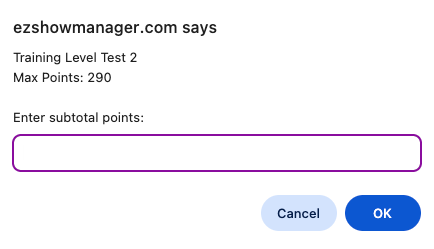
Step 1: Enter Subtotal Points
👉 Add all movement scores and collective marks:
- Include coefficient scores (doubled movements)
- Enter the subtotal points earned
Step 2: Enter Error Deductions
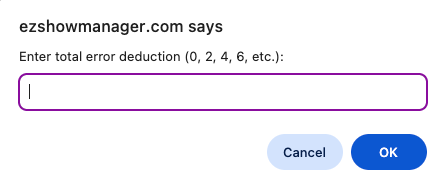
👉 Enter total error deductions:
- Examples: 0, 2, 4, 6, etc.
Step 3: Calculate Percentage
The system calculates:
Percentage = (Total Points ÷ Max Points) × 100
Where:
- Total Points = Subtotal − Error Deductions
Step 4: Confirm Score
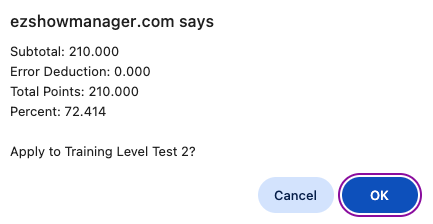
The system will display:
- Subtotal
- Error Deduction
- Total Points
- Final Percentage
👉 Click OK to apply the score
Rounding
- Final percentages are rounded to three decimal places
- This follows standard USEF/USDF scoring practices
Placing Entries
Placings are based on the final percentage score.
👉 Highest percentage wins
- 1st place = highest %
- 2nd place = next highest %
- And so on
Using Calculate Place
You can use:
👉 Calculate Place
- Automatically ranks entries within each test
- Based on their final percentage scores
Manual Override
- You can edit scores at any time
- FX calculations are optional
Why This Matters
- Matches standard dressage scoring sheets
- Ensures accurate percentage calculations
- Reduces math errors
- Speeds up scoring during busy shows