
Negative Balance & Locked Show Creation
In rare cases, a show may result in a negative balance.
This typically happens when refunds exceed the funds collected for that specific show.
How a Negative Balance Can Happen
Example:
- A show is canceled (weather, emergency, etc.)
- All entries are refunded
- EZ Show Manager fees are non-refundable
👉 Since platform fees are still owed, the show may end up with a negative balance
Important: Balance is Per Show
Balances are tracked per show, not across your entire account.
- One show may be positive
- Another may be negative
👉 A negative balance must be resolved for that specific show
What Happens if You Have a Negative Balance
If a show goes negative:
- The Create New Show button will display a red border
- You will see a “Pay Balance” button

👉 New show creation will be temporarily locked until the balance is resolved
How to Resolve a Negative Balance
- Click Pay Balance
- Review the balance details
- Generate and pay the invoice
Once paid:
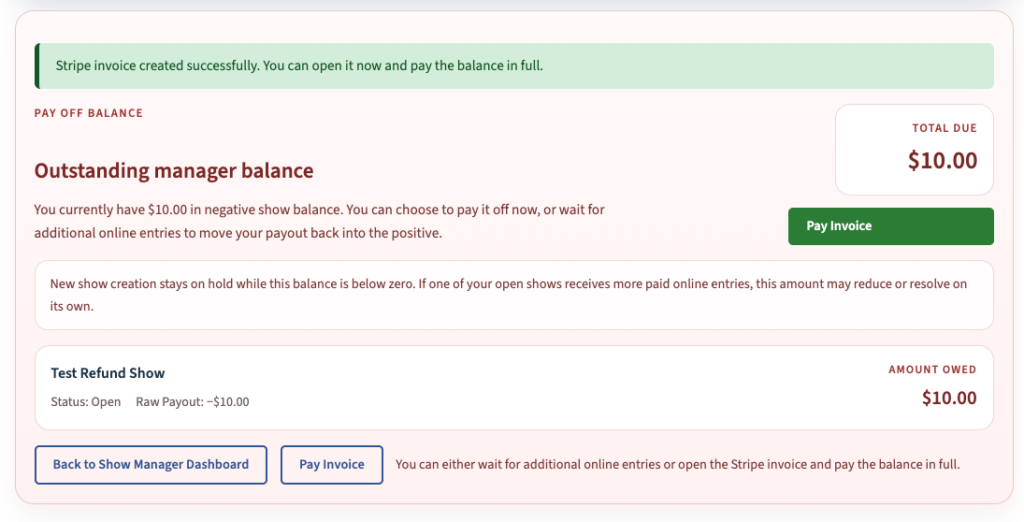
👉 Your show balance returns to $0.00
👉 You can create new shows again
During a Live Show
If you are actively running a show:
- A refund may temporarily put you in a negative balance
- You can continue operating as normal
👉 Additional entries may bring your balance back positive without needing to pay an invoice
Already Paid but Still Collecting Entries?
No problem.
If you pay off a balance and continue collecting entries:
👉 That payment is factored into your final payout
You are not losing those funds — everything is reconciled in your show totals
Why This Exists
- Ensures platform fees are covered
- Keeps show-level accounting accurate
- Prevents balances from carrying across events
Next Step
👉 Continue to Using the Manager Dashboard Reporting Tool