
Secretary Dashboard: Driven Dressage & Driving CT
The Secretary Dashboard for Driven Dressage and Driving Trial events works the same as other show types, with a few key differences for scoring and organization.
Key Difference: Phases
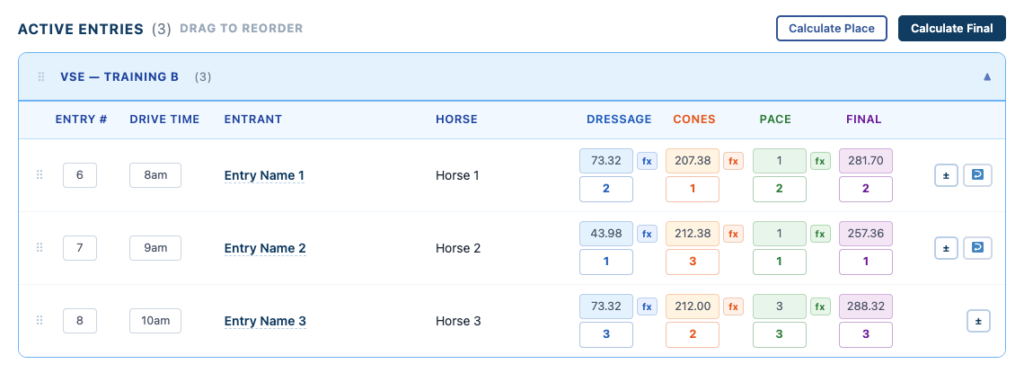
The main difference is how scoring phases are displayed:
- Driven Dressage
- Displays Dressage only
- Driving Combined Trial (CT)
- Displays:
- Dressage
- Cones
- Pace
- Displays:
👉 You can choose to use only the phases you need
Example: Dressage + Cones with no Pace
Dashboard Functionality
All standard Secretary tools remain the same:
- Approving entries
- Managing classes
- Reordering entries
- Adding walk-ins
- Posting public notes
Active Entries View
The Active Entries section is organized differently:
👉 Entries are grouped by:
- Division
- Test
This keeps results structured correctly for driving events.
Managing Entries
Secretaries can:
- Assign or edit Entry Numbers
- Assign Drive Times
- Manage entry placement within each group
Scoring Options
You have two ways to enter scores:
Manual Entry
- Enter scores directly into the fields
Using the fx Button
- Click fx to calculate scores automatically
- Uses the built-in scoring formulas for each phase
👉 Recommended for accuracy and consistency
Placing Entries
Automatic Placement
After entering scores, you can use:
👉 Calculate Place
- Calculates placings for the current phase
- Can be used for:
- Dressage
- Cones
- Pace
👉 You can reuse this button for each section as needed
Final Standings
Once all phases are complete:
👉 Click Calculate Final
- Combines all phase results
- Calculates overall standings
- Applies tie-breaking rules automatically
What This Means
- Same familiar workflow as other shows
- Additional structure for driving events
- Flexible phase usage
- Built-in scoring support
Next Step
👉 Continue to Driven Dressage & Driving Trial Scoring
🔥 This keeps it:
- Familiar (no intimidation)
- Clear on differences
- Connected to your scoring article