
Search
Managing the Clinic Waitlist
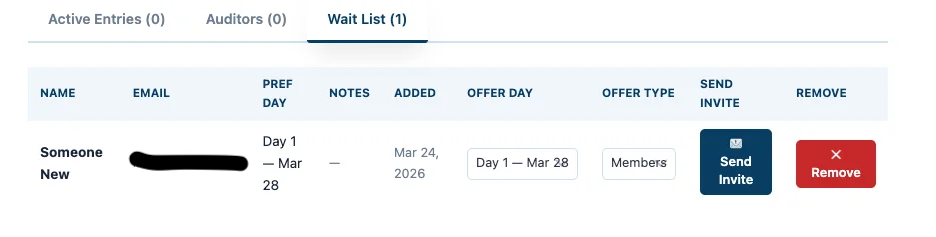
If your clinic is full, you can manage participants through the Waitlist.
How to Send an Invite
- Click on the Waitlist Tab
- Locate the person you want to add
- Click Send Invite
What Happens Next
- The participant receives an email with a private entry form
- This form is unique to them and allows them to complete registration
👉 Their spot is not confirmed until they complete the entry
Adding Additional Clinic Spots
If your schedule allows for more participants:
- You can use the waitlist to add an additional clinic spot
- Simply send an invite to a waitlisted participant
👉 This is useful if:
- Sessions are running efficiently
- Additional time becomes available
- The instructor approves adding more participants
Removing Someone from the Waitlist
If needed:
- Go to the Waitlist Tab
- Locate the participant
- Remove them from the list
Clinic Refund Policy (Important)
At your discretion, you may choose to delay issuing a refund for a clinic spot until:
- A waitlisted participant has been invited
- Their entry has been completed and approved
👉 This helps ensure your clinic remains full and prevents loss of revenue
Why This Matters
- Keeps your clinic at full capacity
- Protects your revenue
- Gives you flexibility to expand when possible