
Search
Refunds & Entry Changes
If you need to make changes to your entry or request a refund, everything can now be managed directly from your My Shows Dashboard.
How to Access Your Entry
- Log into your account
- Click My Shows
- Select the show you entered
👉 Your entry will be displayed as a card with all relevant details
Available Options
From your entry card, you have three options:
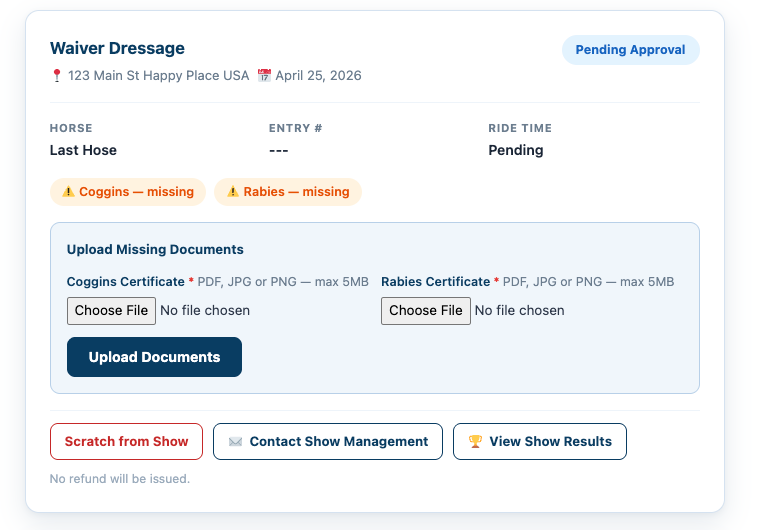
Scratch from Show
👉 Click Scratch from Show
- Removes your entry from the event
- Notifies the show secretary
- Does NOT automatically issue a refund
⚠️ Refunds are determined by the show manager’s policies
Request Changes or Refund
👉 Click Contact Show Management
Use this option to:
- Request entry changes
- Ask questions about your entry
- Request a refund
👉 This sends a direct message to the show manager/secretary
Upload Missing Documents
If required documents are missing (Coggins, Rabies, etc.):
👉 Use the Upload Documents section
- Upload directly from your entry card
- Required before approval in most cases
Important Notes
- All refunds are handled by the show manager
- EZ Show Manager fees are non-refundable
- Entries may remain pending until all required information is submitted
What This Means
- No need to email or track people down
- Everything is managed in one place
- Faster communication with show management