
Using the Liability Waiver Option
EZ Show Manager allows you to collect and store digital liability waivers for your shows.
This option is available in your Show Manager Settings.
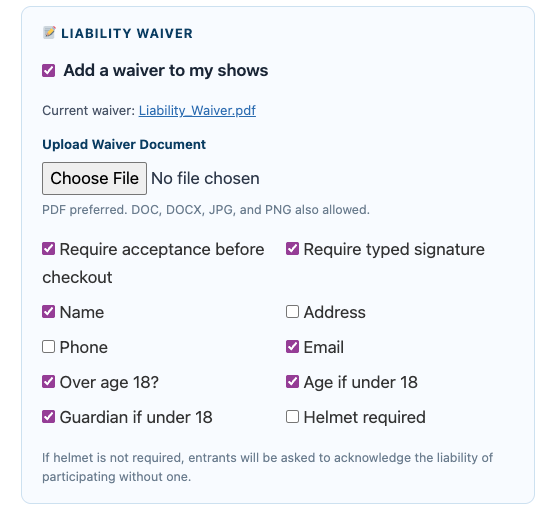
How to Enable the Waiver
- Go to Show Manager Settings
- Check “Add a waiver to my shows”
- Upload your waiver document
- EZSM does not provide waivers, consult with your attorney
👉 Supported formats:
- PDF (preferred)
- DOC / DOCX
- JPG / PNG
Waiver Requirements
You can choose what information is required from entrants:
- Name
- Phone
- Address
- Age / Over 18
- Guardian (if under 18)
- Helmet acknowledgement
You can also require:
- ✅ Acceptance before checkout
- ✅ Typed signature
How The System Handles Signing
When enabled, EZ Show Manager can:
- Require the entrant to open the waiver document before accepting it
- Require a typed electronic signature
- Verify that the typed signature matches the expected signer
- Switch the signer to the parent or legal guardian when the entrant is under 18
- Require helmet acknowledgment based on your waiver settings
- Require under-18 entrants to acknowledge helmet use even if helmets are optional for adults at that show
What Is Recorded
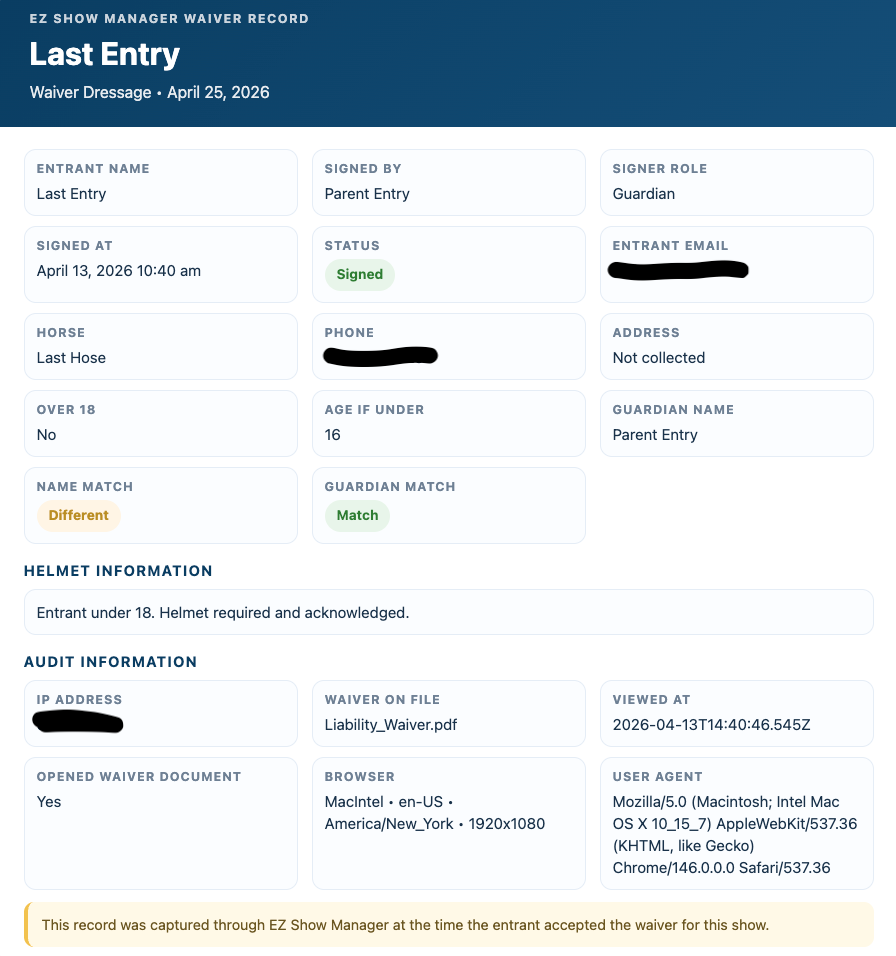
- Each signed waiver record can include:
- A preserved copy of the signed waiver version on file at the time of signing
- Entrant name
- Signed by name
- Guardian name if provided
- Signature match validation
- Date and time signed
- IP address
- Browser and device details
- Waiver document viewed confirmation
Where to Find Waivers
All waiver records are stored in your:
👉 Show Manager Dashboard → Waivers
Viewing a Waiver Record
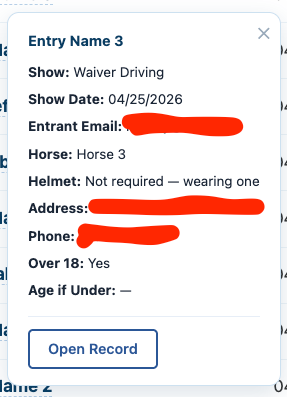
You can:
- Search by Show or Entry
- Click on the entrant name
- Click Open Record
Electronic Signature Standards
EZ Show Manager is designed to support electronic waiver workflows consistent with common U.S. electronic signature standards, including:
- The federal E-SIGN Act
- New York ESRA for New York-based use
- Similar state electronic signature laws, including UETA where applicable
In general, these laws recognize electronic signatures and electronic records when they are associated with the document and adopted with intent to sign.
Important Disclaimer
EZ Show Manager provides tools to collect, store, and organize waiver records. It does not guarantee that any waiver will be enforceable in your jurisdiction or for your specific event.
EZ Show Manager does not provide legal advice, insurance advice, or compliance advice.
You are responsible for:
- Confirming whether additional parental consent, witness, notarization, or recordkeeping steps are needed for minors or higher-risk activities
- The wording and legal sufficiency of your waiver
- Determining whether your waiver meets your state’s laws
- Confirming whether your insurance carrier has specific waiver requirements
You should review your waiver with your attorney and insurance provider before relying on it.