
Secretary Office: Managing Your Show
The Secretary Office is the powerhouse of your show.
This is where entries are reviewed, classes are managed, and results are recorded — all in one place, in real time.
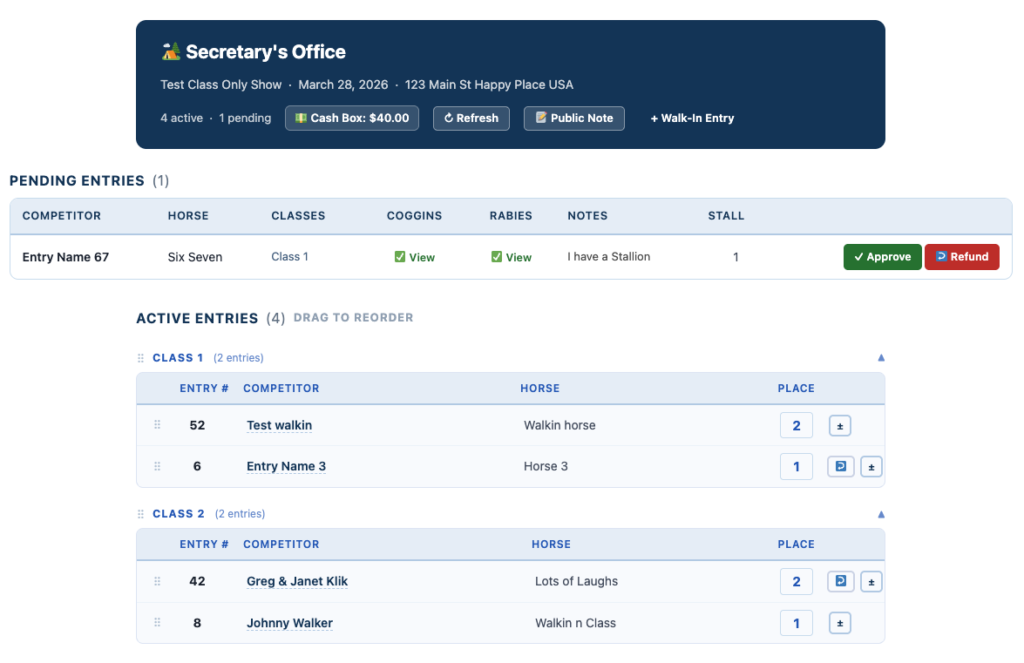
Secretary Header Overview
At the top of the page, you’ll see key show details to confirm you’re working in the correct event:
- Show Name
- Date
- Location
You’ll also see:
- # Active Entries
- # Pending Entries
- Cash Box Total
- Refresh Button → Quickly update the page
- Public Note Button
📢 Public Notes
You can post a message directly to the Results Page for all exhibitors to see.
Examples:
- “Classes delayed 1 hour”
- “Canceled due to thunderstorms”
- Default display: Yellow note card
- If the word “Canceled” is used → card turns Red
Multi-Show Access
If you are assigned as secretary for multiple shows:
- Mini show cards appear below the header
- Quickly switch between events without leaving the page
Pending Entries
This section shows all new entries awaiting review.
You can view:
- Competitor and horse information
- Selected classes
- Add-ons
- Notes
- Uploaded documents:
- Coggins
- Rabies
Actions
- ✅ Approve Entry
- Moves the entry into the correct class in Active Entries
- 🔁 Request Refund
- Sends a notification to the Show Manager
- Refunds are processed from the Manager Dashboard
Walk-In Entries (Cash)
Use the + Walk-In Entry button in the header to add day-of entries.
This quick form will:
- Add the entry directly to the active class list
- Calculate total fees
- Show exactly what to collect for your cash box
Active Entries
This is where your show is actively managed.
Each Division or Class has its own entry list displaying:
- Entry #
- Competitor Name
- Horse Name
- Placing
Key Features
🔄 Drag & Drop Reordering
- Reorder classes
- Reorder entries within each class
➕➖ Add / Drop Entries
- Add or remove entries from classes
- System will:
- Calculate adjustments
- Show what to collect or refund
🔁 Move Back to Pending
- Return an entry to Pending
- Used when initiating an online refund
🔢 Entry Numbers
- Auto-generated
- Can be edited to match your numbering system
🏆 Placings
Enter results using simple codes:
- 1, 2, 3, 4, 5, 6
- CH (Champion)
- RC (Reserve Champion)
- SC, DQ, or any custom code
Live Results (Automatic Updates)
Everything you do in Active Entries is reflected on the Results Page:
👉 Updates automatically every 30 seconds
- Class order
- Entry order
- Placings
No More Secretary Tent Crowds
Exhibitors can follow results live from anywhere.
No more:
- Handwritten sheets
- Stapling papers to boards
- Crowds waiting for updates
Need Paper Results?
No problem.
The Results Page includes:
- Save / Print option