
Additional Entry Form Questions
The Additional Questions feature allows show managers to collect extra information from entries during checkout.
This feature is optional and can be customized for each show.
Where to Find It
When creating or editing a show:
- Scroll to the bottom of the show setup form
- Locate the Additional Questions section below Add-Ons
- Click Add Question
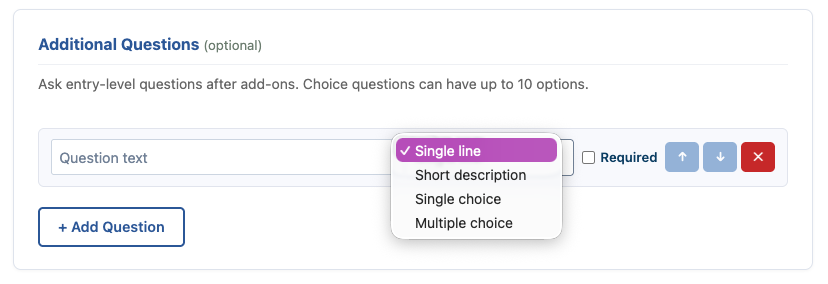
Question Types
You can create several types of questions depending on the information you want to collect.
Single Line
Best for short answers such as:
- T-shirt size
- Stallmate requests
- Emergency contact name
Short Description
Best for slightly longer responses such as:
- Horse bio for announcer
- Special accommodations
- Comments for show management
Single Choice
Allows entrants to select one option from a list.
Examples:
- Lunch selection
- Volunteer role preference
- Division selection
Multiple Choice
Allows entrants to select multiple options.
Examples:
- Volunteer availability
- Setup
- Tear Down
- Day Of Show
- Multiple meal selections
- Areas of interest
Required Questions
Each question can optionally be marked as:
- Required
- Optional
If marked required, entrants must answer before submitting their entry.
Reordering Questions
Use the arrow buttons to:
- Move questions up or down
- Control the order they appear on the entry form
Removing Questions
Click the red X button to remove a question.
Why Use Additional Questions
Additional Questions allow you to customize your entry process beyond standard entry fields.
Popular uses include:
- Volunteer coordination
- Meal planning
- T-shirt orders
- Announcer notes
- Camping information
- Stable requests
- Emergency details
The possibilities are nearly endless and help tailor entries specifically to your event.
Important Notes
- Questions are tied to the specific show being edited
- Choice questions support up to 10 options
- Responses are visible in secretary and management tools